
Applying for government positions through the Public Service Commission (PSC) of Kenya is handled online via the official recruitment portal (psckjobs.go.ke or pscims.publicservice.go.ke).
Tracking your application status allows you to monitor shortlisting, interview schedules, and submission records
How to Register on the PSC Portal (First-Time Users)
Before applying for vacancies or checking statuses, first-time users must register an account on the portal:
- Go to the official PSC portal at psckjobs.go.ke.
- Click on Register / Sign Up on the top navigation bar.
- Enter your National ID / Passport Number, Surname, active Email Address, and a preferred Password.
- Click Submit to complete registration.
How to Check Your Job Application Status
To check whether your application has been received or shortlisted:
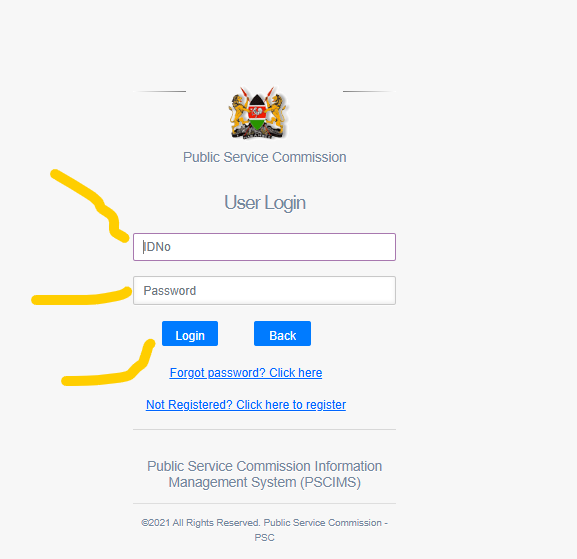
- Log in to your PSC account using your credentials.
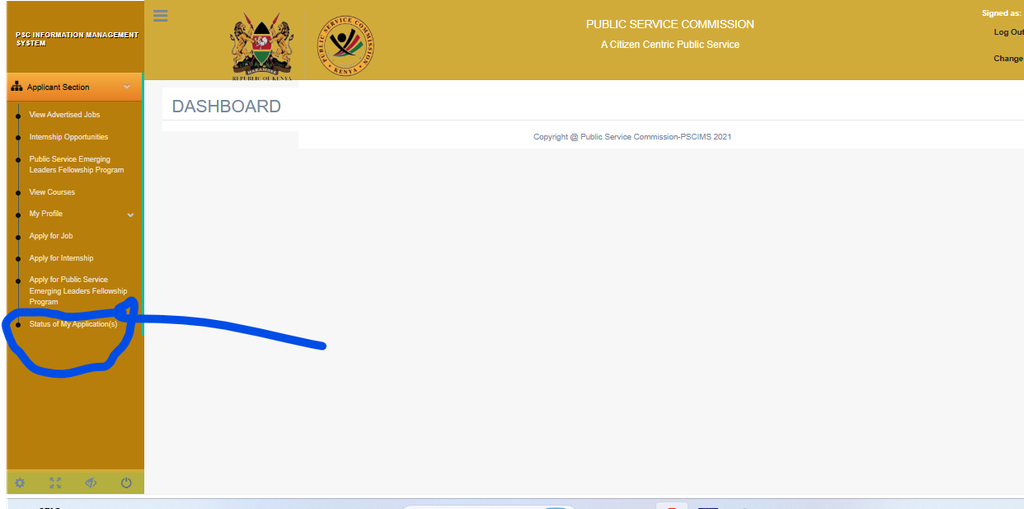
- On the main account menu, click on Status of Your Application(s) or Application Status.
- A summary table will list all positions you have applied for alongside their advert numbers and current status.
- Locate the specific job post to see its progress.
Understanding Application Status Meanings
| Application Status | What It Means | Recommended Action |
| Submitted / Received | Your application was logged into the database. | No action needed. Wait for shortlisting. |
| Under Review / Processing | Applications are currently being evaluated against job criteria. | Check the portal periodically for updates. |
| Shortlisted | You have met the requirements and been selected for interviews. | Prepare compliance documents and interview materials. |
| Unsuccessful / Regret | Your application was not selected for this recruitment drive. | Keep applying for future advertised posts. |
How to Download Your Application Summary
Always keep an official record of your submission for verification purposes during interviews:
- Log into your account dashboard.
- Click on the Report tab or select Application Summary from the menu.
- Review your generated Feedback Report.
- Click Print or save it as a PDF for your personal records.
Frequently Asked Questions (FAQs)
How do I reset my PSC portal password?
If you cannot remember your password:
- Open the psckjobs.go.ke Login Page.
- Click the Forgot password? Click here link.
- Enter your registered ID/Passport Number or Email Address.
- Submit the request. A password reset link will be sent to your registered email address.
- Check both your Inbox and Spam/Junk folders, click the reset link, and set a new password.
Can I edit or update my application details after submitting?
Yes. The portal permits applicants to revise or update qualification details on submitted applications any time before the advert closure date. Once the application deadline passes, no further edits are permitted.
Also see: NIS Career Portal Registration Requirements